Category: Code
-

Connecting to the Pulse Database
Since Pulse v5.6, Pulse uses only one h2 database by default, to access the data you just need to connect to the docs.h2.db. Instead of the h2 database, since v5.6 you can migrate your Pulse data to a MS SQL Server.
-
Canvas
A framework to build custom and modern web applications.
-
TM1py Support by Cubewise
Do you want to use TM1py and need access to support? Sign-up for official TM1py Support offered by Cubewise.
-

Fine-tuning for Pulse
The pulse default configuration should be enough for most environments. This article shares some tips to improve the performance of Pulse if it slows down. Migrating to MS SQL Server The default H2 database is single-threaded. It means that if you have many Pulse users and many TM1 instances. The queries to the database might…
-
Downloading elements during the documentation
By default, Pulse is going to download the elements for all dimensions with fewer elements than the maximum number of elements defined in Pulse.cfg (MaximumElements). If you don’t need Pulse to download elements, you should turn this off. By turning this off, the documentation will be significantly faster because Pulse will not have to request…
-
Making TM1 REST API queries faster
Pulse is mainly making three REST API queries (one to get the sessions, one to get the threads, and one to get the logs). This article shares some recommendations to make these queries even faster. Reducing the size of the tm1server.log file When Pulse is asking IBM Planning Analytics (TM1) to get the logs, TM1…
-
Pulse Features
The complete DevOps software built for TM1 Monitor. Understand. Manage. Monitor. Understand. Manage. One centralized application connected to many TM1 servers When working with multiple TM1 servers, you can choose between installing one Pulse 6 server that will monitor many TM1 servers or installing Pulse 6 on each server. There are many advantages of a…
-
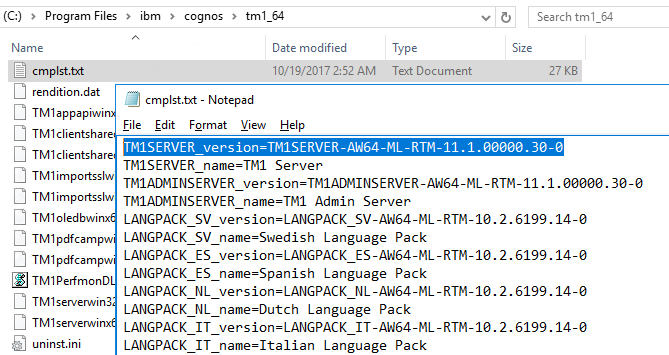
Determine the version of IBM Planning Analytics
Updated on the Nov,2nd 2022
-
Pulse Improve TM1
Continuously improve your TM1 applications As the data volumes, computational complexity, and user community of your IBM Planning Analytics (TM1) applications grow over time, effectively monitoring the health of your system becomes vital to business continuity. And by “effective”, we do not just mean in-the-moment, but over time. Performance Productivity Quality Continuously improving performance System…
-
Pulse Migration
Migrate faster with confidence The Pulse migration features bring you the confidence to migrate IBM Planning Analytics (TM1) objects quickly by understanding all impacts on the TM1 objects, quickly rollback changes and much more… Understand all possible impacts Pulse automatically documents all your TM1 objects. Pulse’s smart documentation brings you the confidence to apply new…