Category: Blog
-
Check if the TM1 REST API is enabled
TM1py uses the TM1 REST API to connect to TM1.
-

Upgrade TM1py
To upgrade TM1py, after checking your current version, just open the command line and type:
-

Generate MDX Queries from Cubeview
MDX is a fast and powerful way to query data from TM1 Cubes. It can play a key role when you combine your TM1 models with other technologies (e.g. Canvas, R, Python).
-

Find unused dimensions
Ever wondered which of the dimensions in your TM1 Model are not used in cubes?
-

Cleanup your TM1 application
Sometimes our TM1 models (especially non-production environments) become messed up with temporary and unwanted objects, like
-

Upload Exchange rate from a Webservice
Your TM1 models can get great benefits from external information, e.g., FX rates, weather forecast, data on commodity prices or consumer confidence. Webservices like Yahoo Finance, Bloomberg or FRED, offer a range of financial and non-financial information. Many of them are Free to use.
-
Install TM1py
TM1py is a Python package that wraps the TM1 REST API in a simple to use library. That makes it easy to build stuff with TM1 and python.
-

The differences between IBM Planning Analytics Workspace and Canvas
The world has changed, user experience is now the most decisive factor in the success of any business application that is built for people, and TM1-based applications are no exception. Despite inferior modelling capability and performance, other (non-TM1) software solutions have become popular almost solely on the fact that they meet modern user expectations for user experience.
-
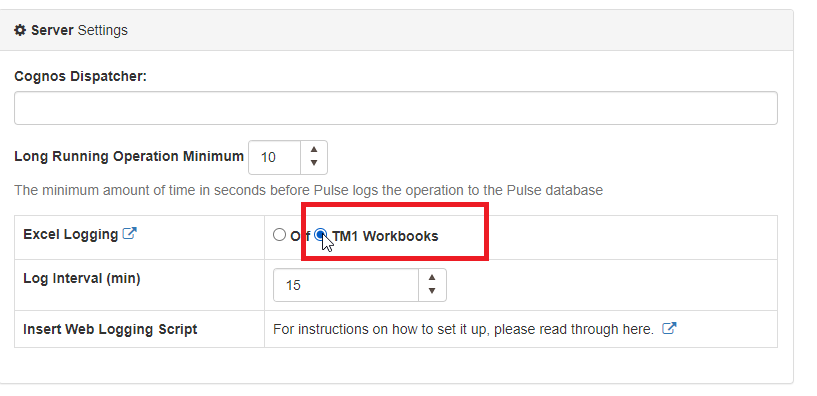
Setting Up Excel Logging to Pulse with Excel Logger
To enable Excel logging in Pulse, you first need to go to Administration > Configuration and then tick “TM1 Workbook” as below:
-

Pulse v5.6 Released
The best TM1 management system just got better thanks to the great feedback we have received from our 150+ customers worldwide.