Category: How To
-

Create a simple table
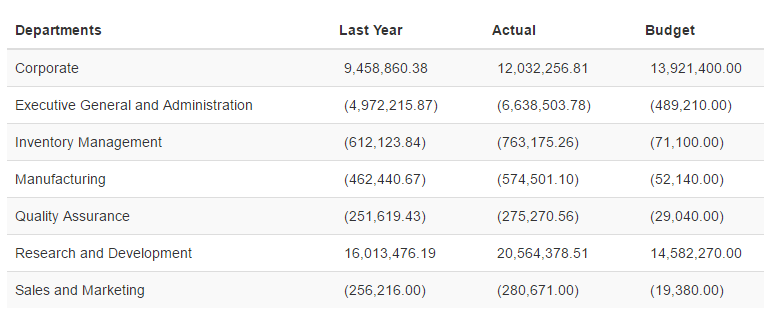
The objective is to create the following table, one column with the departments and the second will be Actual values:
-
Create a table with dynamic columns
The objective is to create a table with rows and columns driven by a subset. By having your table driven by subsets, you will be able to manage your report from TM1, any changes made on the subsets in TM1 will be reflected automatically into the Canvas report.
-

How to use ng-repeat with TM1
ng-repeat is an Angular JS directives, it loop over a template for each item in a collection. For more general information about ng-repeat, you can check the Angular Help section.
-

Retrieve a list of elements from a subset
The objective is to create and then to show in your Canvas a list of elements from TM1 that you can use for your reports. Below is a simple table that you will be able to create after going through this tutorial:
-

Disable Cache
By default your web browser will keep the cache. If you make a change in your html code, it might not appear in your browser.
-
How to add Javascript support to your Canvas page
Feeling a little more adventurous? Things can potentially be simpler if handled via Javascript. But how do you add that to your Canvas page? Here is how:
-

Update the Pulse Application Server JVM maximum memory
The Java application server (pulseas.exe) which runs in the background has a default memory of 1024 MB.
-
Customising Your Email Alerts (Pulse v5.5.1 or earlier version)
Pulse now enables you to customise the email that is generated based on alert criteria. This is useful if you want to integrate the Pulse alerts into an existing help desk/ticketing system that accepts email as a ticket input source.
-

Merging Migration Packages
Pulse allows you to merge existing packages if they haven’t already been executed. This allows you to aggregate multiple changes into one large package that can be provided to your operations or run team to upgrade your test and/or production system.
-

Compare Two TM1 Servers Using Pulse
Pulse makes it easy to compare two TM1 instances with the migration features: