Category: Product
-

Where to install Pulse
If you are using IBM Planning Analytics (TM1) on the IBM Cloud (PA SaaS), you have two options: Centralized vs decentralized When installing Pulse 6, you can choose between these two main options: ⚠️ More resources are required by Pulse 6 vs Pulse 5, please check the new system requirements before installing Pulse: Where to…
-
Pulse Installation Steps
This article explains the steps to install Pulse either on each TM1 server or on a separate server. Installing Pulse on each TM1 server Installing Pulse v6 on a TM1 server is straight forward: Then you will need to repeat these steps on each TM1 server. Installing Pulse on a separate server A centralized Pulse…
-

Downgrading Pulse
Downgrading is not recommended We always recommend upgrading Pulse to the latest version. Once Pulse has been upgraded, it is not recommended to downgrade to a previous version. If you have an issue after the upgrade, please create a ticket here and we will help to see if we can fix the issue without having…
-
Arc Stories
Stories from TM1 developers like you “I have been a TM1 developer for 18 years now. I’ve always loved TI and have managed to get around the timely nuances it brought. But with Arc, TI has been incredibly enhanced and improved. Being able to see multiple server stats, cube views, client security, rules, chores and…
-
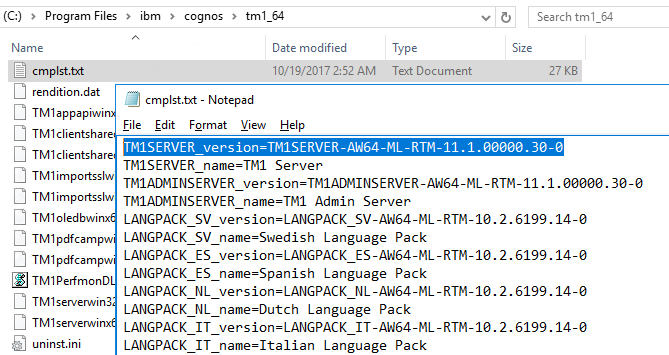
Determine the version of IBM Planning Analytics
Updated on the Nov,2nd 2022
-

Cube Viewer and Subset Editor Hidden Gems
Arc continues to establish itself as a well know state of the art development interface for IBM Planning Analytics (TM1) developers.
-
Pulse Improve TM1
Continuously improve your TM1 applications As the data volumes, computational complexity, and user community of your IBM Planning Analytics (TM1) applications grow over time, effectively monitoring the health of your system becomes vital to business continuity. And by “effective”, we do not just mean in-the-moment, but over time. Performance Productivity Quality Continuously improving performance System…
-
Pulse Migration
Migrate faster with confidence The Pulse migration features bring you the confidence to migrate IBM Planning Analytics (TM1) objects quickly by understanding all impacts on the TM1 objects, quickly rollback changes and much more… Understand all possible impacts Pulse automatically documents all your TM1 objects. Pulse’s smart documentation brings you the confidence to apply new…
-
Pulse Monitor
Monitor all your servers on one screen Pulse gives you the confidence to handle the complexity that comes with expanded use of your applications. Monitor what’s happening Pulse allows you to monitor your system live in both the web interface and the rich Windows client. All of the important metrics second by second are in…
-
arc-manage-tm1
Easier to manage TM1 users and instances Arc helps TM1 administrators to monitor and configure IBM Planning Analytics and TM1 instances. All administration tasks are gathered in modules.manage-tm1 All security operations into one screen Search for a specific user or group. Create a new user or group by cloning an existing user or group security.…